
01 Case study · Healthcare · Web app
From paperwork to approved: 80% less manual effort.
Metropolitan Anesthesia Consultants, a US healthcare company, runs contractor credentialing, document compliance and timesheets. Tailwebs built the web app they use for it. Their entire manual process moved into the app, reducing manual effort by 80%. The screens on this page are rebuilt with sample data only.
- Client
- Metropolitan Anesthesia Consultants
- Built
- Contractor credentialing, document compliance and timesheets in one web app
- Engagement
- Web app built by Tailwebs

From paperwork to approved
Follow one sample contractor from paperwork to approved.
A rebuilt, simplified view of the flow, using sample data only: one "Sample contractor" and two locations, "Hospital A" and "Hospital B". A contractor is prospective, credentialing, active or inactive. Pick a stage to watch it run.
- Documents and approval
A contractor starts as prospective and moves to credentialing. Each required document goes from missing to uploaded to approved. A contractor is activated only after the required documents are approved.
- Expiry alerts
Documents are tracked to expiry, with alerts at 60, 30 and 14 days.
- Weekly timesheet
Weekly timesheets record hours by location and shift type, then roll into billing reports totalled the same way.
Sample contractor
- Prospective
- Credentialing
- Active
- Inactive
- Document Amissing
- Document Bmissing
- Document Cmissing
Locked until every document is approved
- 60 days
- 30 days
- 14 days
0 of 7 days filled (a sample week)
- MonHospital ADay8 h
- TueHospital ADay8 h
- WedHospital BNight6 h
- ThuHospital BNight6 h
- FriHospital ADay8 h
- SatHospital BDay4 h
- SunHospital ADay4 h
Billing report, sample hours
By location
By shift type
Ready. Pick a stage to start.
This is an illustration rebuilt with sample data. "Sample contractor", the documents, the dates and the hours are not real records, and no real screen is shown.
03 The moves
What we did, move by move.
- Move 1
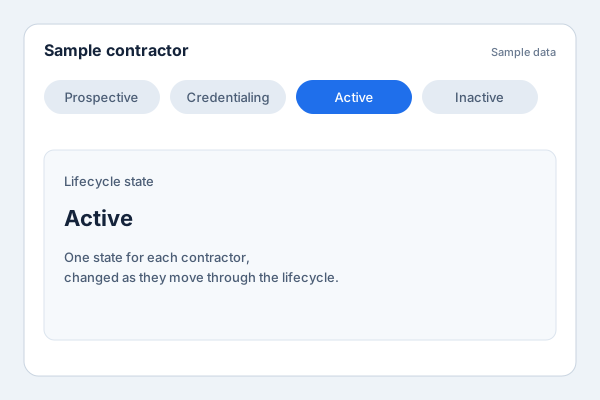
One lifecycle for every contractor
What we saw The process was manual, and contractors move through four states: prospective, credentialing, active and inactive.
What we did We built that lifecycle into the app.
The effect Each contractor has one clear state, which changes as they move on.
- Move 2
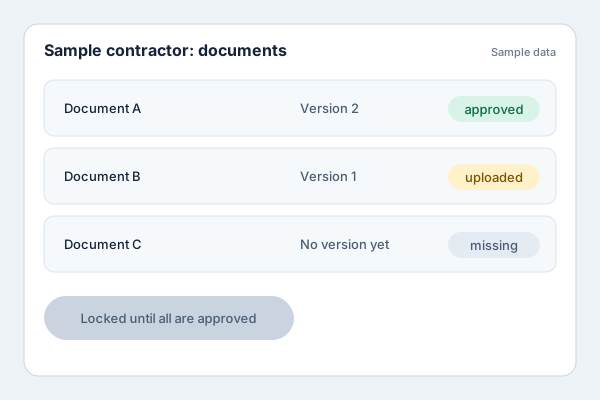
Documents approved and tracked to expiry
What we saw Required documents are part of the process, and documents expire.
What we did We built document handling into the app. Required documents are versioned and approved before activation, and expiry alerts go out at 60, 30 and 14 days.
The effect A contractor is activated only after approval, and a document nearing expiry raises alerts ahead of time.
- Move 3
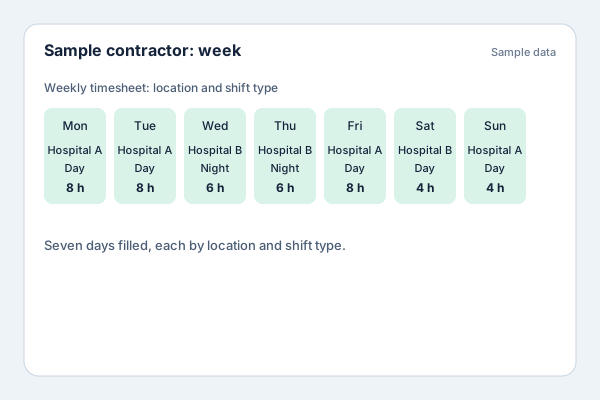
Weekly timesheets by location and shift type
What we saw Hours are recorded weekly, by location and shift type.
What we did We built weekly timesheets that record hours by location and shift type.
The effect Each week’s hours sit against a location and a shift type.
- Move 4
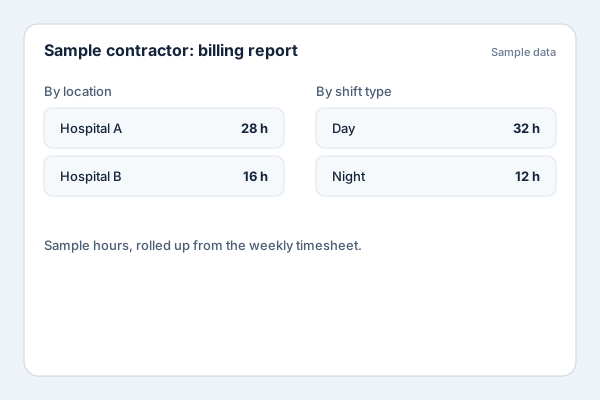
Billing reports built from the timesheets
What we saw Weekly timesheets roll into billing reports.
What we did We built billing reports fed by the weekly timesheets.
The effect Billing reports draw on the timesheets already in the app.
04 Results
What the moves added up to.
- 80%less manual effort, once their entire manual process moved into the appFrom moves 1, 2, 3, 4: One lifecycle for every contractor; Documents approved and tracked to expiry; Weekly timesheets by location and shift type; Billing reports built from the timesheets
05 Book a call
Moving a manual process into an app? Talk to us.
You'll speak with Siddharth.

06 Keep reading